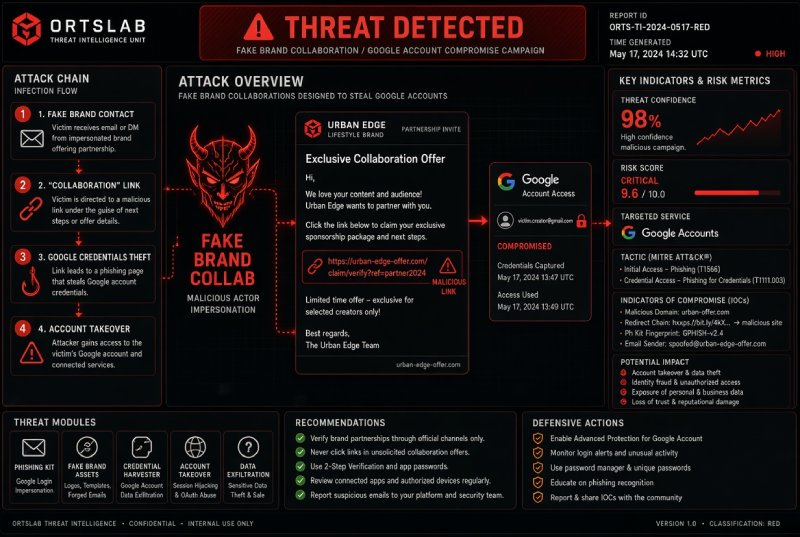
A Peruvian journalist who publishes on YouTube gets an email from "Brandi," on the Creator Partnerships team at Hollyland, a maker of wireless transmission and audiovisual equipment. The message mentions specific videos from her channel, offers a free device and floats a possible long-term collaboration. She replies with her rates and receives an invitation to a platform where, she is told, she can verify the stats, the agreement and the payment. The platform exists. The collaboration doesn't. It is the scheme ESET WeLiveSecurity described on October 7, 2026, and its only purpose is to take over the creator's Google account.
🔍 Suspicious message?
Analyze senders, links or files in real time with our scanner.
The email: personalized, from a sender that isn't the brand
The hook is a "paid collaboration opportunity" that looks like part of the routine of any channel with a decent audience. What holds the deception together is the personalization: the message mentions real videos from the channel, something anyone can do with public YouTube information. The red flag, according to ESET, was that the sender's domain had nothing to do with Hollyland. The documented example is that journalist's, but ESET found variants using other brands and other domains.
The fake platform: metrics, logos and an income calculator
The link the victim receives points to joinmatchy[.]com/hollyland, a site built to look like an established collaboration platform: campaign metrics, logos of major companies, a calculator estimating how much you would earn, and supposed tools to automate contract negotiation, joint projects and payments. It also asks for the creator's YouTube channel URL. With it, the site pulls the channel's public data and personalizes the page, so the creator sees their own name and their own numbers inside an environment that looks tailor-made for them.
The Google sign-in that isn't Google
The site doesn't ask for a password up front. It redirects to a Google sign-in screen under the pretext of confirming that the creator owns the channel. The step is believable because signing in with Google is a legitimate, familiar mechanism. But the genuine flow, by default, only shares your name, email address and profile picture with the site; and if it asked for channel management permissions, it would allow uploading or deleting videos. The scam's screen is an imitation: it captures the password and the one-time code, and with them the attackers get into the account. A code like that expires quickly, so whoever receives it can use it immediately, while it is still valid.
After the theft: they change the locks
One victim reported that the attackers replaced her phone number and recovery email with their own and added their own backup codes. That step is what makes recovery hard: the recovery details already point to the attacker. From there, the account gives access to Gmail and Google Drive, and lets the attacker impersonate the owner to followers and collaborators, spread malicious links and promote other scams.
A modular scam: Hollyland, Nike, Spotify and "Scouty"
ESET describes a modular scheme: the functionality, favicons, meta descriptions and parts of the source code are reused, and only the brand identity changes. Besides Hollyland, the attackers impersonated Nike and Spotify, and there are several domains named "Scouty." The domains and identities changed repeatedly between June and August, and ESET warns that the same strategy may return under new ones. Hollyland had already publicly warned about the campaign. Known cases include the Peruvian journalist, creators in Japan who reported it in a YouTube support thread, and English-speaking creators who described it on Reddit.
This isn't the first time a fake sponsorship has been used as bait to steal channels. In December 2024, CloudSEK documented a campaign targeting more than 200,000 YouTube creators, with emails titled "Collaboration Proposal" or "Marketing Opportunity" and password-protected archives hosted on OneDrive, disguised as contracts or promotional material. Inside were executables that steal credentials and session cookies or give remote access. The variant ESET describes reaches the same result with no file at all: there is nothing to download, only a sign-in screen. ESET does not publish the exact "Scouty" domains.
What to look for: indicators from this campaign
- Fake platform domains:
joinmatchy[.]com/hollylandandmatchyjoin[.]com, the latter with the same function and a redirect to a fake Google sign-in. - A sender signing as "Brandi" and claiming to be on Hollyland's Creator Partnerships team.
- A sponsorship offer you didn't ask for, from a sender whose domain isn't the brand's.
- A "verification" site that asks for your channel URL and redirects you to a Google sign-in screen.
- A sign-in screen that asks for channel management permissions, when verifying ownership doesn't need them.
Don't do this:
- Don't follow the link to a "verification" or "collaboration management" platform sent by someone who has just contacted you for the first time.
- Don't take an offer at face value because it mentions your videos or because the site shows well-known brand logos: both are easy to fake with public information and a bit of design.
- Don't sign in with Google from a screen you reached through a link in an email without checking the page address first.
- Don't grant channel management permissions to a site that says it only wants to confirm you own the channel: it doesn't need them for that.
- Don't enter a verification code on any page that isn't the service's own.
Do this:
- Confirm the offer through an official channel: find the brand's contact details yourself and verify both the proposal and the sender, without using the email you received.
- Examine the sender's domain and the domain of every platform you're sent to. Professional design and familiar brands prove nothing.
- Before signing in with Google, confirm the page is on the provider's own domain (
accounts.google.com) and review the list of permissions. Don't authorize apps you don't recognize. - Use strong, unique passwords, turn on two-step verification and consider moving to passkeys. A passkey is bound to the service's real domain: on a fake page, the browser simply won't offer it, whereas a password and a code can be typed into any site.
- If you've already entered your details, act quickly: open Google's Security Checkup and review recent security events, signed-in devices, sign-in methods, recovery information and third-party connections. Remove anything you don't recognize.
- Change your password and turn on two-step verification if you hadn't. Don't go back to the suspicious site or give it any further access.
- If you can't log in, or you see changes you didn't make (a new phone number, recovery email or backup codes), use Google's official account recovery page.
- Once you regain access, undo everything the attackers changed and, if messages or links were sent from the account, warn your followers and collaborators.
An unsolicited sponsorship offer has only one verifiable fact: who is really sending it. Everything else (the videos it quotes, the logos, the income calculator) is built from the channel's own public information. And the "Sign in with Google" button can only be trusted when the address of the page showing it is Google's.