Someone is looking for a new cryptocurrency wallet, or a free version of a paid app, and finds it promoted in a post on X or in a Telegram group. It's called Toria. The problem is that Toria doesn't exist as a real product — it's the shell that MacSync, a piece of macOS malware, uses to install itself on the computer of whoever downloads it.
🔍 Suspicious message?
Analyze senders, links or files in real time with our scanner.
How it gets in: fake wallets, pirated apps, and the trick of pasting a command into Terminal
Kaspersky, which documented this new infection chain in September 2026, has identified several different entry points for the same malware. The oldest one is a ClickFix-style campaign — pages that pose as a security check or as a tool to "fix" a system problem, and that actually ask the user to copy and paste a command into Terminal. In this case, the pages disguise themselves as Homebrew (the most widely used package manager on Mac) or as disk-space analyzers. The more recent route is more direct: a DMG file posing as a real application — including that non-existent crypto wallet, Toria — promoted on websites, X, and Telegram.
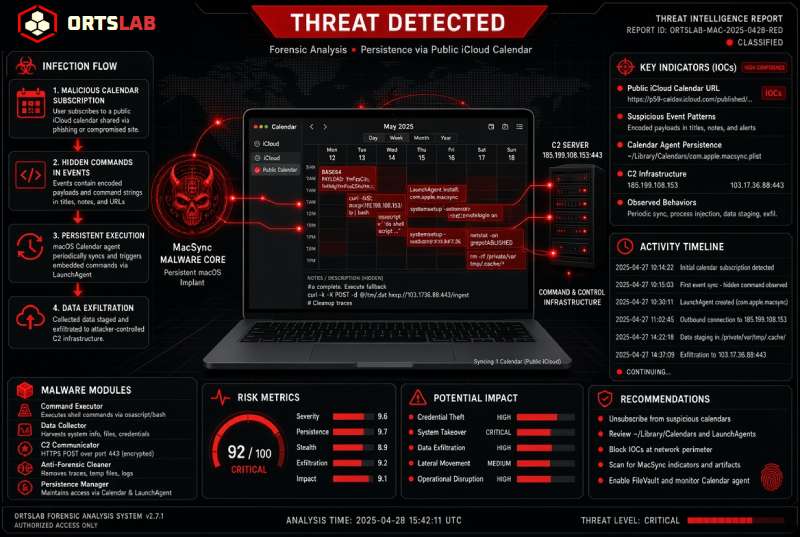
Opening the DMG runs a JXA script (JavaScript for Automation, macOS's native scripting language) in memory, or starts a loader. That loader retrieves an encrypted address and, in at least one of the documented cases, uses it to reach a public iCloud calendar.
The iCloud calendar acting as a command server
A publicly shared iCloud calendar isn't unusual by itself — it's a feature meant to coordinate schedules with people who don't even need an Apple account. MacSync uses it very differently: it hides the commands it needs to run inside the description field of a calendar event. The loader reads that description, extracts the commands, and runs them directly on the system.
Those commands download an archive containing the next-stage application, strip the quarantine flag macOS adds to anything downloaded from the internet, attach an ad-hoc signature so Gatekeeper doesn't block it, and run it. At no point does the user need to do anything else: the entire process, from the initial DMG to the final malware, happens without any further clicks on their part.
What it steals and how it stays in: a backdoor disguised as Finder
What gets installed at the end of that chain are two pieces. The first is an information stealer (infostealer) that collects browser history and cookies, saved passwords, cryptocurrency wallet data, Telegram data, macOS Keychain secrets, and configuration files for SSH, AWS, Kubernetes, and Git — essentially any credential a developer or a regular cryptocurrency user tends to keep stored on their computer.
The second piece, new in this version according to Kaspersky, is a backdoor that poses as Finder itself. It installs as a LaunchAgent named com.apple.finder.agent, and ensures it stays active after every restart by modifying the user's .zshrc file and adding hooks (pre-commit, post-checkout) to any Git repositories it finds. With that backdoor in place, whoever controls it can run custom AppleScript code, install malicious browser extensions, replace legitimate applications — such as Ledger wallet apps — with fake versions, and collect files from the machine at will.
Don't do this:
- Don't paste or run any command in Terminal that a website, a "how to fix your Mac" video, or a supposed security check asks you to — this is the ClickFix technique, one of this malware's entry points.
- Don't download apps, cryptocurrency wallets, or "disk cleanup tools" from websites, ads, X profiles, or Telegram groups that aren't the developer's own official channel.
- Don't open a DMG file for an app you don't recognize just because it promises to be free, better, or faster than the original — Toria, the crypto wallet used in this campaign, doesn't even exist as a real product.
- Don't enter your macOS administrator password without knowing exactly which process is asking for it and why.
Do this:
- Download applications and cryptocurrency wallets only from the App Store or the developer's official website, never from a link shared on social media or Telegram.
- If you need Homebrew or a disk-space analyzer, install it from its official repository (brew.sh, or the project's own GitHub repository) — never from an installer that reaches you through any other channel.
- Check which apps are set up as login items (System Settings → General → Login Items, or the
launchctl listcommand in Terminal) and be suspicious of anything you don't recognize, especially if it poses as Finder. - If you suspect your Mac may be infected, also check your
.zshrcfile and the Git hooks (pre-commit,post-checkout) in your repositories — these are two of the places this malware hides to survive a restart. - Change the passwords stored in Keychain and rotate your SSH/AWS keys if you've run any suspicious command, and move your crypto wallet funds to a new one if you have any doubts.
- Keep two-factor authentication turned on for the services you use (banking, exchanges, email) — it won't prevent the infection, but it limits the damage if a password gets stolen.
A publicly shared iCloud calendar isn't suspicious on its own — it's a feature plenty of people use every day without a second thought. That's exactly what makes it useful to whoever is spreading malware: it doesn't raise any alarms, because it was never built to. The real defense isn't distrusting every normal feature of the operating system — it's never running a command in Terminal just because a website told you to.