A social media ad, or a text message with a link to "install this app and get X." The victim installs the file directly, outside Google Play, and when they open it, the app asks for the Accessibility Service permission to "work properly." They grant it — and from that point on, the phone starts moving on its own: screens scrolling, buttons tapping, with no one touching them. It's not a glitch. It's RatHat, an Android malware discovered by researchers at Zimperium zLabs, controlling the device remotely — with the help of an artificial intelligence.
🔍 Suspicious message?
Analyze senders, links or files in real time with our scanner.
What makes RatHat different: an AI that "sees" the screen and decides what to tap
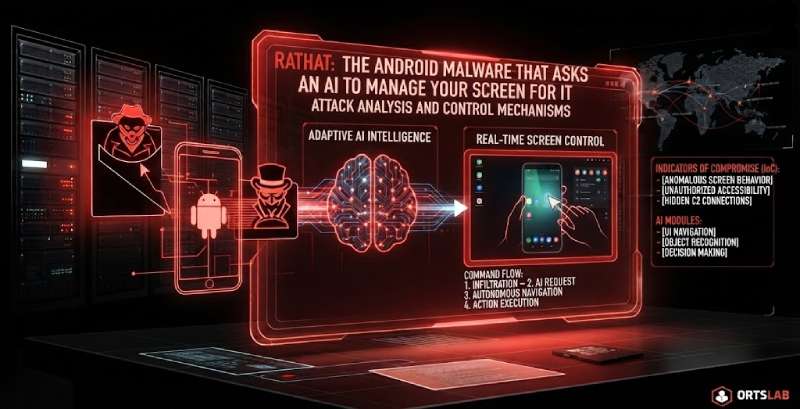
Android malware that steals banking credentials is nothing new — Manic, which we've already covered in this Observatory, does something similar. What changes with RatHat is how it decides what to do at each step. Instead of following a fixed script programmed in advance (which antivirus software can learn to recognize by its repeated patterns), RatHat converts whatever is on the phone's screen — Android's accessibility tree, originally built for screen readers and other assistive tools — into an XML document, and sends it to one of the world's most popular generative AI assistants. The AI identifies what's on screen, exactly where each button sits and what text is written, and sends back instructions like "scroll down" or the precise coordinates where a tap should be simulated.
Zimperium sums it up this way: "RatHat uses AI to intelligently navigate and control the device interface in real-time, making operations more adaptable and harder for security software to detect than traditional, scripted automation." In other words: the malware no longer needs a human operator watching the screen live to decide the next move — it asks an AI, on the fly, every single time.
How the back door opens: Developer Options and Wireless Debugging
The most striking part, technically, is how it gets full control of the system without the victim doing anything beyond installing the app. Using that same Accessibility permission, RatHat automates a sequence that's normally done on purpose by a developer: it taps the "Build Number" seven times in a row to unlock Developer Options, turns on Wireless Debugging (a feature meant to let a programmer connect their computer to the phone without a USB cable), and reads the 6-digit pairing code and port that Android generates for that connection straight off the screen. With that code, it authenticates itself against the phone using an ADB library embedded in the malware — no external computer needed, and no one else involved.
The result is shell-level (command-line) access to the device itself — the same kind of control that would normally require the phone to be physically plugged into a computer. Two native components keep that access alive: one runs commands and sets up battery-optimization exemptions so the system never kills the process for being idle; the other builds a persistent remote tunnel back to the attackers' server, reusing an open-source project (frp) to do it.
What it steals, and why it's so hard to get rid of
With that level of access, RatHat displays fake overlay screens on top of banking and payment apps to capture whatever credentials the victim types in, intercepts SMS messages and notifications (including one-time codes sent by banks), logs text typed into other apps, reads the URL from the browser's address bar, and captures the lock-screen PIN or pattern.
And when the victim tries to uninstall it, it doesn't go quietly: RatHat intercepts the uninstall confirmation screen, cancels it, and shows a fake error message designed to look like a Google Play failure, so the person assumes it's just a system glitch. Because one of the two native components doesn't depend on the app's normal lifecycle, it keeps running in the background and automatically reinstalls the malware if it detects it's been removed.
Is this a threat outside China?
To be honest: the campaign Zimperium has documented so far uses fake overlays targeting payment apps that are heavily used in China — WeChat and Alipay among them — and the researchers themselves attribute it to actors who appear to be operating from China, based on the language used in the prompts the malware sends to the AI. As of now, there's no evidence this specific campaign is targeting banks outside that region.
But the technique itself doesn't respect borders. The same abuse of the Accessibility permission used by RatHat is the same mechanism we already saw in Manic, and it's exactly the kind of thing cybercrime groups copy the moment it's proven to work — regardless of which country it debuted in. The fact that today's targets are Chinese apps doesn't mean this particular way of automating fraud with AI won't show up, adapted, against banks elsewhere. It's precisely the kind of capability worth having on the radar before it arrives, not after.
Don't do this:
- Don't install apps from outside Google Play — not from a text message link, not from an ad, not from a download site, no matter how tempting the offer.
- Don't grant the Accessibility Service permission to any app that isn't genuinely a screen reader or another real accessibility tool — almost no ordinary app needs it to function.
- Don't ignore it if Developer Options or Wireless Debugging turn out to be enabled and you didn't do it yourself — that setting doesn't switch itself on.
- Don't enter your banking credentials if your bank's app is behaving oddly, loading differently than usual, or asking for your login right after you've installed something new.
Do this:
- Only download apps from Google Play, and check what permissions they ask for before accepting — especially Accessibility.
- Keep Google Play Protect turned on and let it scan the device regularly.
- Every so often, check which apps currently have Accessibility permission (Settings → Accessibility → Downloaded apps) and revoke it from anything that doesn't genuinely need it.
- If you suspect your phone is infected and can't uninstall the suspicious app (or the system throws an error when you try), restart the phone in safe mode to remove it without the malware being able to interfere, then change your banking passwords and any account credentials you may have used while the phone was infected — from a different, clean device.
- If you spot charges or logins you don't recognize, contact your bank immediately to block the activity, and report it to your country's cybercrime or fraud reporting authority.
What makes RatHat different isn't that it steals banking credentials — Android malware has been doing that for a decade. It's that, instead of following a fixed script antivirus software can learn to recognize, it asks an artificial intelligence what to tap and where to move, on the fly, as if someone were watching the screen in real time. Once malware starts deciding instead of just executing, the best defense stops being guessing what it'll do next — and becomes, simply, not letting it in.