On September 9, 347,000 newsletter subscribers of Trezor — the hardware wallet maker — received an email from help@trezor.io. The subject line: a "critical security alert." The claim: a vulnerability in the STM32 microcontroller used in Trezor devices that could let an attacker brute-force a wallet's recovery seed. The fix the email offered: download an app and enter the wallet's backup into it — in other words, the recovery phrase that controls every fund in it.
There was no vulnerability. The email was the attack.
🔍 Suspicious message?
Analyze senders, links or files in real time with our scanner.
What actually happened, and why the sender address checked out
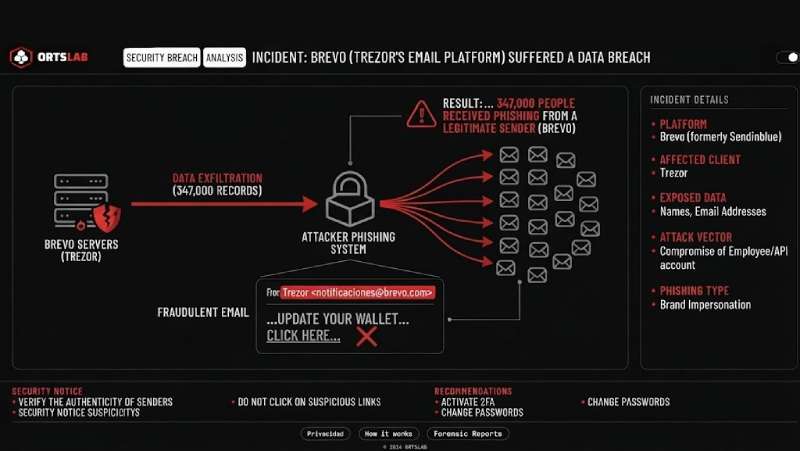
Trezor didn't send it, even though the address was genuine. The entry point was Brevo, the third-party platform Trezor uses to run newsletter campaigns for subscribers who opted in. Brevo suffered a breach affecting 120 customer accounts, Trezor's among them. With access to that account, the attackers didn't need to forge anything — they used Trezor's own legitimate sending system to reach its own list of 347,000 addresses. Trezor caught the malicious domain and took it down within 20 minutes. In that window, 2,500 people had already clicked.
It's the third such incident for Trezor in recent months: a breach at its support portal earlier exposed 66,000 customers, and one at ShipMonk, its logistics provider, exposed another 81,000, as BleepingComputer reported. The pattern keeps repeating for a simple reason — the weak link is rarely the company you know. It's usually a vendor of theirs holding your contact data.
Why a genuine sender address stopped being proof of anything
When an attacker compromises a company's email marketing tool, they inherit things they could never forge on their own — a genuine sender history, the real list of actual customers, and the brand's exact visual template. Every mental check people normally run to spot a fake email ("is this really from the right address," "am I actually a customer of this," "does it look right") stops working, because all of those checks pass. The email is indistinguishable from a legitimate one because, strictly speaking, it is one — sent from the real system, to the real list, from the real sender. The only fake part is the content.
This mechanism isn't unique to crypto wallets. The same pattern shows up whenever a company's messaging or CRM vendor gets breached: the message arrives through a channel that was legitimate up until that moment, and that history alone is often enough to lower people's guard.
If you get an urgent email from a company you're actually a customer of
Don't do this:
- Don't install any app or update anything through a link in an unsolicited "security alert" email — even if the sender address checks out and you genuinely are a customer.
- Don't enter a recovery phrase, password, or any credential into a site or app you reached through an email link.
- Don't let the message's urgency ("critical vulnerability," "act now") make the decision for you — that urgency is the warning sign, not a reason to move fast.
Do this instead:
- Verify any security notice through a channel you control, not the one the email hands you: open the official app directly or type the website from memory.
- Check whether the company has posted anything about the alleged incident on its verified official channels (blog, social accounts).
- If you already entered a seed phrase or wallet backup into a suspicious site or app, treat that wallet as compromised and move the funds immediately to a new wallet generated offline, with a fresh seed.
- If you installed an unknown app because of an email like this, disconnect the device from the network and scan it or factory-reset it; change any password you may have reused elsewhere.
- Report the incident to your local cybercrime authority.
A genuine sender address only certifies where an email came from, not what it says. When the channel is legitimate but the content isn't, recognizing who sent it stops being a real defense — the only one that still works is distrusting any link, no matter who it's from, the moment it asks for a credential or an urgent install.