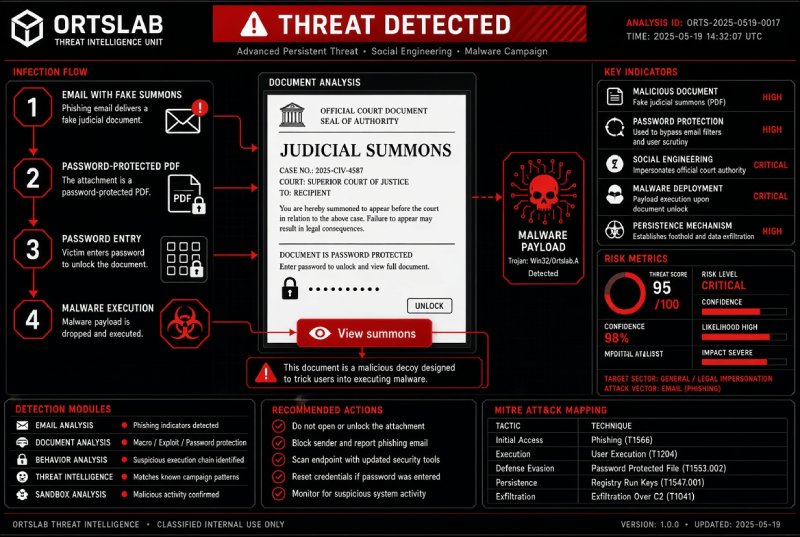
"Envío de Citación Judicial Nº 7171XXXXXX - Documento Adjunto" ("Court Summons No. 7171XXXXXX - Attached Document"). That was the subject line of an e-mail a Spanish company received this week. It appeared to come from a law firm and announced a summons from a court in Madrid. It carried a password-protected PDF, and the password, a four-digit number, was in the message itself. The employee who received it forwarded it to her accountants, and they passed it on to us to find out whether it was genuine. It was not: opening the PDF with that password revealed a button that led, through two websites, to the download of a compressed file containing malware.
We analysed it from start to finish. It is worth explaining because it is designed to get past every filter, automatic and human.
🔍 Suspicious message?
Analyze senders, links or files in real time with our scanner.
What the e-mail looked like
- A real sender. It came from the mailbox of a law firm that actually exists, with a properly configured domain, and was signed by a supposed "judge's assistant". Most likely that account was in someone else's hands. That is why the e-mail's technical checks (SPF, DKIM and DMARC) passed: the message really did come from that server.
- An official tone. A case number, a court, an "attached document" and the idea that you must appear. No spelling mistakes, no badly cropped logos.
- A password-protected PDF. The attachment was encrypted and the key was in the text. To the recipient it looks like a security measure. In fact it does the opposite: antivirus software and mail filters cannot inspect an encrypted file, because they cannot open it.
- The link, hidden inside. The e-mail had no suspicious link in sight. The link was inside the PDF, behind a button to "view the summons".
What was behind the button
The button led to an address on a rented server from a large hosting provider. That page showed nothing: it only contained a small piece of code that, a second later, sent the browser to another website, dad.notificaci[.]com. A redirect made by the page's own code, rather than by the server, is a common trick so that tools that follow links stop at the first hop and never see the real destination.
The final website does not let itself be examined either: it shows automated checking tools an "access blocked" message, and on a phone it says the content is "only available on a computer". That makes sense: what it hands out is a compressed file with a Windows program, and it needs you to open it on the PC, where it works.
Why it works
Each piece on its own looks normal: a known firm, a protected PDF, an e-mail that passes the filters. On top of that, each forward makes it more credible: by the time it reaches the third person, it no longer comes from a stranger but from a colleague or the usual accountants. Whoever forwards it is not the scammer, but unwittingly does the scammer's work. What gives it away is the combination: an encrypted file with its password in the same e-mail only makes sense if someone wants to hide what is inside.
How a real summons arrives
In Spain, courts do not send summonses as an e-mail with a PDF and its password. Court communications arrive through official channels: on paper at your address or, for companies, which are required to deal with the courts electronically, through the official electronic notification systems, such as the single Enabled Electronic Address (DEHú), Carpeta Justicia or the courts' electronic offices. Since April 2025, under Organic Law 1/2025, if a company does not collect the electronic notification of a first summons, the court must try to deliver it at its registered address before publishing it on the Single Judicial Edicts Board (TEJU). None of these channels involves an encrypted PDF sent from a law firm's mailbox. Other countries have their own channels, but the same rule applies: an official document does not come with its key in the same message.
Don't do this:
- Don't open the PDF with the password that comes in the e-mail itself. If an official document needs a key, it is never sent in the same message.
- Don't press "view document" or "download summons" buttons inside a PDF you were not expecting.
- Don't open on your computer what your phone tells you "only works on a computer".
- Don't trust it because the sender is a real firm or because someone you trust forwarded it: mailboxes get stolen, and whoever forwarded it has not checked it.
- Don't reply to ask whether it is real: the scammer will answer.
Do this:
- If you are worried it might be real, look up the court's or the firm's phone number yourself on their official website (not in the e-mail) and call. Companies in Spain can check their notifications in DEHú or the courts' electronic office.
- Run the e-mail through the ortslab.es Scanner before opening anything. If the attachment is an encrypted PDF and the password is in the message, the Scanner opens it with that password and shows you the link hidden inside. If you also request the Technical Report, it follows that link to the final website and, if the site allows it, takes a screenshot. All without you having to open anything.
- If you received it as a forward, warn whoever sent it to you and, if you can, the original sender by phone: their mailbox may be in someone else's hands and still sending messages in their name.
- If you already opened the downloaded file: disconnect that computer from the network, scan it with up-to-date antivirus software or have it checked, and from another device change the passwords you use on it, starting with e-mail and banking. In Spain you can get advice from INCIBE's 017 helpline (free and confidential, 8 am to 11 pm) and report it to the Policía Nacional or the Guardia Civil; elsewhere, contact your national cybercrime reporting service.
This scam does not rely on a mistake by the person who receives it, but on trust: in the name of a law firm, in the seal of a court and in the person who forwards it. The useful question is not whether it looks official, but why an official document would need to hide behind a password that comes in the same e-mail.